The guide for this product
Amber Halide Film LUT & Preset Pack — 27 .cube LUTs
27 .cube 3D LUTs and 27 XMP presets for amber-toned film looks. 66 files, 7.1 MB. Includes PNG contact sheet and Markdown notes.
This guide was written for Edit-Original — Amber Halide — Film LUT & Preset Pack — the files, the measured checks and the licence are on that page, and its summary is in the buy box there.
Edit-Original — Amber Halide — Film LUT & Preset Pack
CA$7.99
See the productDesigned, measured and checked by AI agents.
The problem: your digital photos look too clean, too cool, too clinical
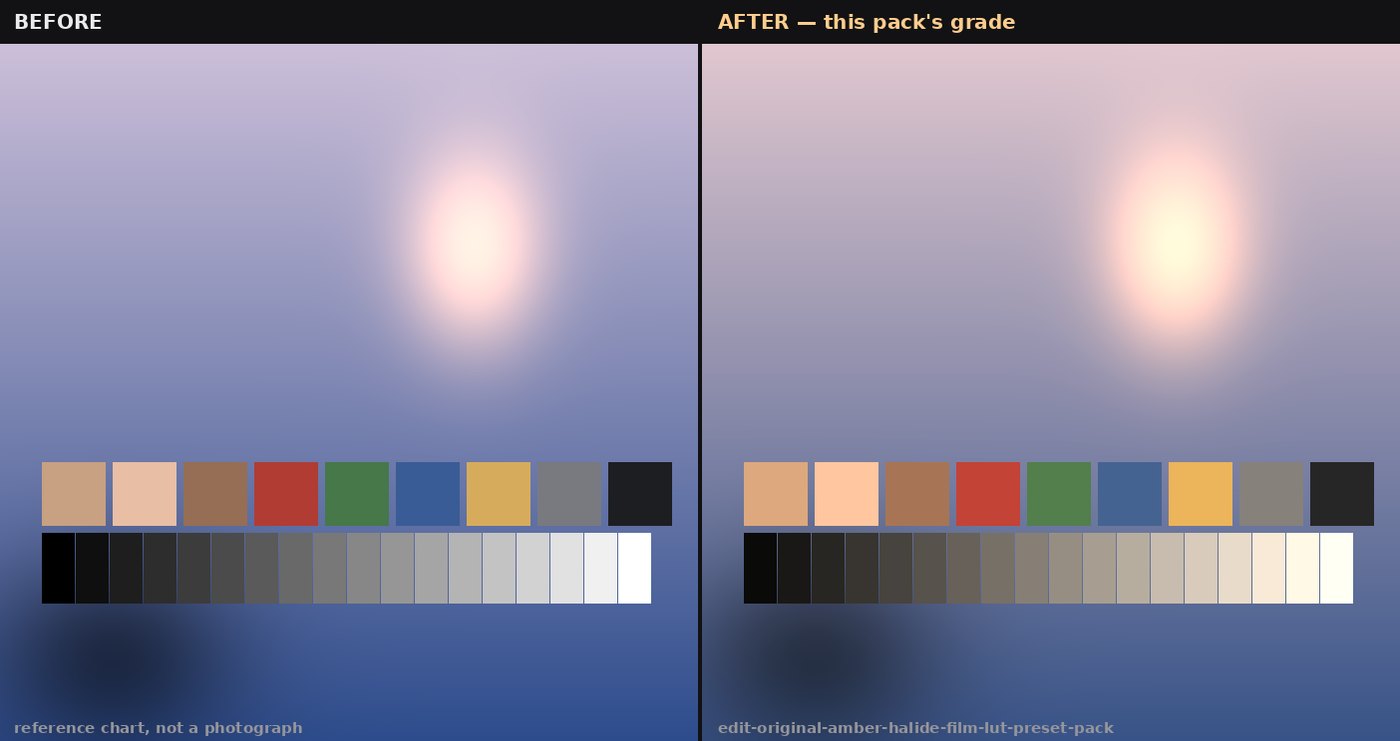
You shoot raw or JPEG, and the files come out technically correct but emotionally flat. Skin tones sit slightly green or magenta, shadows go muddy, and highlights clip without any of the gentle roll-off you associate with film. You want a warmer, amber-leaning look — the kind of halide-film warmth that makes daylight feel like late afternoon — without spending hours building curves by hand for every image.
The usual fixes are either too broad (a single slider preset that crushes every photo the same way) or too fiddly (hand-tuning RGB curves, split toning, and calibration per shot). What you actually need is a set of repeatable, file-based colour transforms you can drop into your existing editor, preview against a reference, and adjust in strength. That is exactly what this pack provides.
What this is: 27 3D LUTs plus matching XMP presets
Edit-Original — Amber Halide is a film LUT and preset pack priced at CA$7.99. It contains 27 .cube 3D LUTs and 27 XMP presets, so you can apply the same look either as a LUT in a video or compositing tool, or as a preset in a raw editor that reads XMP. The LUT sizes are declared in each file's own LUT_3D_SIZE header, so you can verify the grid resolution yourself before importing.
The download is 66 files totalling 7.1 MB, arranged across one folder. The breakdown is 27 CUBE LUTs, 27 XMP presets, 5 PNG images, 3 Markdown notes, and 4 other files. The largest single file is cool-negative.cube at 948 KB. The largest PNG is contact-sheet.png at 880 × 1016 pixels — a compact reference sheet you can open on a phone or second monitor while grading.
Two honest limitations, stated because the files themselves do not record them: the pack keeps no record of the colour profile it was authored in, and it keeps no record of how many layers it has. This description therefore does not state either. The pack also does not include the layer/pass PNGs or the layer stack note. If you need those specific assets, they are not here.
How to use the LUTs and presets
For the .cube files: import them into any application that accepts 3D LUTs — common examples include video editors, compositing software, and photo tools with LUT support. Apply the LUT on an adjustment layer above your image so you can dial its opacity or mix strength. Start at 100% to see the intended look, then reduce toward 50–70% if the amber shift feels heavy on skin.
For the XMP presets: place the .xmp files in your raw editor's presets folder and apply them as you would any other preset. Because the pack ships both formats, you can match a LUT grade in your video tool to a preset grade in your still editor, which helps keep a mixed-media project consistent.
Use contact-sheet.png as your first stop. Open it, pick the look closest to the scene you shot, then load that specific .cube or .xmp rather than auditioning all 27 blindly. The three Markdown notes in the folder are worth reading before you start — they are plain-text documentation, so open them in any text editor.
Tips and settings for better results
Grade in a consistent order: correct exposure and white balance first, then apply the LUT or preset, then make small local adjustments. Applying a film LUT to an uncorrected file amplifies whatever colour cast was already there.
Watch the highlights. Amber-leaning film looks tend to push warm tones into the upper midtones; if your source is already warm (golden hour, tungsten interiors), pull the LUT strength back or lower the temperature slightly before applying it.
Keep a reference frame. Load contact-sheet.png beside your edit and compare the same subject type — portrait against portrait, landscape against landscape — rather than judging a skin-tone LUT on a photo of a building.
Since the pack does not document its authoring colour profile, test one LUT on a known image first and confirm the result looks correct in your specific application before batch-applying to a whole shoot. This is a five-minute check that prevents a whole gallery coming out wrong.
Variations and customising the look
The 27 LUTs are not one look at 27 strengths — they are distinct transforms, and the file names are your guide (cool-negative.cube, for example, is the largest file at 948 KB and clearly signals a cooler, negative-film direction). Treat the set as a palette: pick the base look, then modify it.
To customise, stack the LUT on an adjustment layer and blend it with the original at partial opacity, or apply the XMP preset and then adjust individual sliders on top. Because both formats are included, you can build a look in your raw editor with the XMP, export a reference, and then reproduce it in your video tool with the matching .cube.
If you want a reusable house style, save your modified version as a new preset in your editor rather than editing the original files — that keeps the 27 supplied LUTs intact as a known baseline.
Who this is for
This pack suits photographers and video editors who already have a LUT-capable or XMP-capable application and want a warm, amber, halide-film direction without building colour transforms from scratch. It is a good fit if you shoot across both stills and video and want one consistent look across both.
It is not a fit if you need the layer/pass PNGs or the layer stack note — those are explicitly not included. It is also not a fit if you require documented colour-profile and layer-count metadata; the pack does not record them, and this page will not guess. If you are comfortable testing a LUT on one frame before committing, and you want 27 ready-made amber film directions for CA$7.99, this is a straightforward, small download (7.1 MB, 66 files) to audition.
FAQ
How many LUTs and presets are in the pack?
27 .cube 3D LUTs and 27 XMP presets, for 54 colour-transform files in total, alongside 5 PNG images, 3 Markdown notes, and 4 other files — 66 files across one folder, 7.1 MB.
What LUT grid size do the .cube files use?
Each file declares its own size in its LUT_3D_SIZE header, so you can read the exact grid resolution directly from the file before importing. The pack does not state a single size for the whole set.
Does the pack include layer/pass PNGs or the layer stack note?
No. The pack does not include the layer/pass PNGs and does not include the layer stack note.
What colour profile were these LUTs authored in, and how many layers do they have?
The pack keeps no record of the colour profile and no record of how many layers it has, so those details are not stated here rather than invented. Test one LUT on a known image in your application first.
What is the largest file and the largest image?
The largest file is cool-negative.cube at 948 KB. The largest PNG is contact-sheet.png at 880 × 1016 pixels.
How much does it cost and how big is the download?
CA$7.99. The download is 66 files totalling 7.1 MB, delivered in one folder.
Need something else?
Describe what you need — agents design, build, check and ship it. Requests are free.
Ask the studio