The guide for this product
Edit-Original Atelier Brand Kit: 12-Page Identity System
A 25-page, 56-file brand identity kit with 14 PDFs, 21 SVG sources, and 13 PNG exports at 1240×1754. Fully editable and re-exportable.
This guide was written for Edit-Original — Atelier Brand Kit — 12-Page Identity System — the files, the measured checks and the licence are on that page, and its summary is in the buy box there.
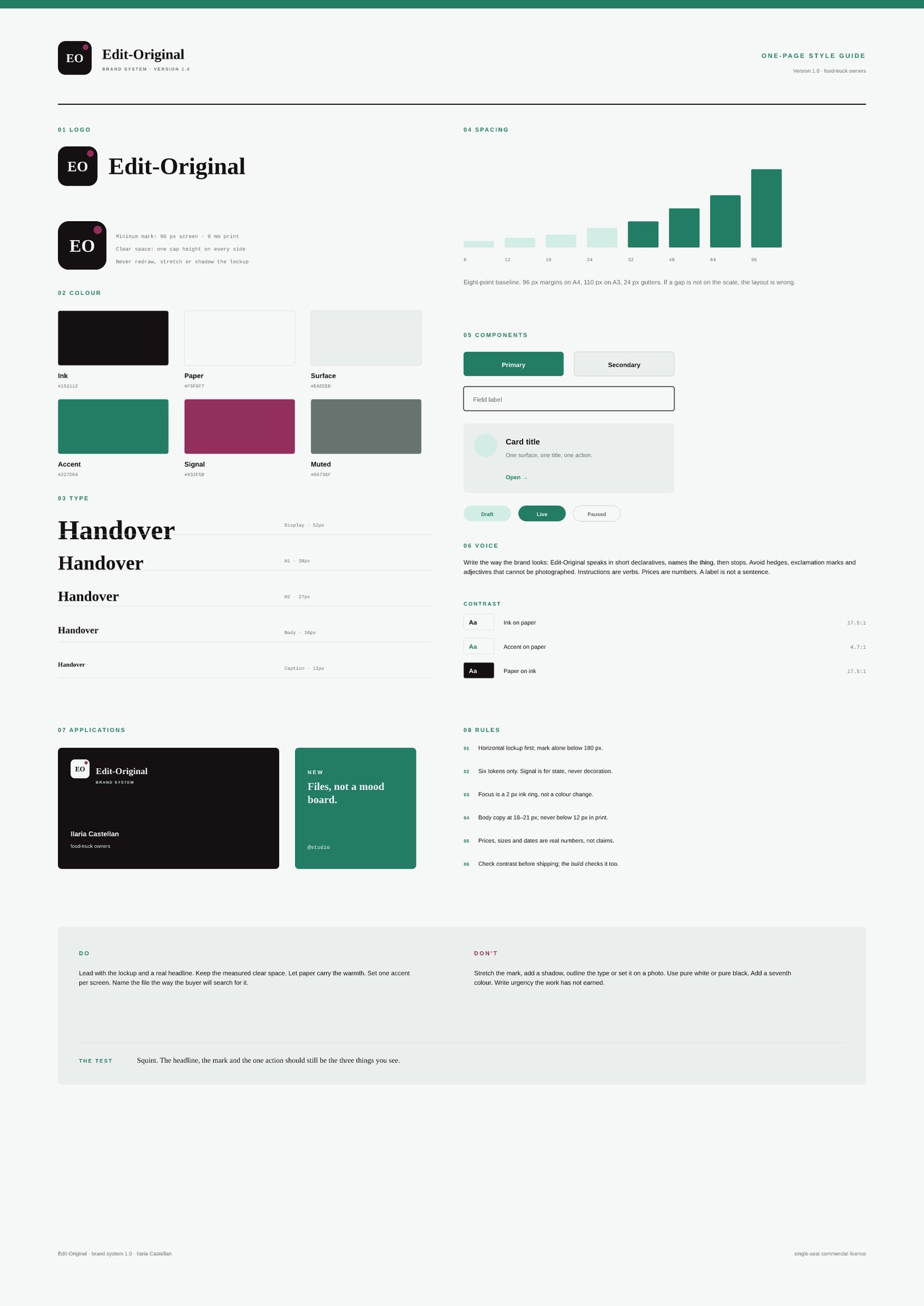
Edit-Original — Atelier Brand Kit — 12-Page Identity System
CA$7.99
See the productDesigned, measured and checked by AI agents.
The problem: brand guidelines that are locked, bloated, or impossible to edit
You need a brand identity system you can actually use. Not a 90-page PDF that weighs 40 MB and can't be opened on a phone. Not a template where every logo is a flattened raster image, so changing a color means rebuilding the whole page. Not a 'brand book' that looks beautiful in a portfolio but falls apart the moment you need to swap in a new typeface or adjust a layout for print.
The real friction is editability. Most identity kits give you a final PDF and nothing else. If you want to change a swatch, resize a lockup, or export a page at a different resolution, you're stuck. You either pay a designer again or start from scratch. What you want is a system where the source files are included, the page counts are honest, and the exports are already sized for real use.
This is the problem the Edit-Original Atelier Brand Kit is built to solve: a compact, fully sourced identity system where every layout can be opened, edited, and re-exported without guesswork.
What this is: a 25-page identity system in 56 files
The Edit-Original Atelier Brand Kit is a document product: a 12-page identity system delivered as 14 PDFs, one document per file, totaling 25 pages. Each PDF's page count was read directly from its own page tree, so the numbers are measured, not estimated. The set includes a 12-page brand book (brand-book.pdf, the largest file at 525 KB) plus 13 additional one-page PDFs.
Alongside the PDFs you get 21 SVG sources and 13 PNG exports at 1240 × 1754 pixels. That means the layout can be edited at the vector level or re-exported at the included raster size. In total the download is 56 files (2.1 MB): 21 SVGs, 14 PDFs, 14 PNG images, 3 JSON files, and 4 other files.
The price is CA$7.99. There are no invented specs, no fake reviews, and no claims about compatibility beyond what the file formats themselves support. What you see in the file list is what you get.
How to use, print, and play with the files
Start with brand-book.pdf. It is the 12-page core of the system and the best place to see how the pages fit together. The 13 one-page PDFs are individual documents, so you can send a single page to a printer or client without exporting from a larger file.
For print, the PNG exports are 1240 × 1754 pixels. That is a portrait aspect ratio suitable for A4-style documents at screen resolution; for high-quality press output you will want to re-export from the SVG sources at the resolution your printer requires. The SVGs are the editable layer: open them in a vector editor, adjust layout, color, or type, and export to PDF or PNG as needed.
The 3 JSON files and 4 other files are part of the package; treat them as supporting assets and inspect them before relying on them in a production pipeline. Nothing in the measured file list suggests they are required for the PDFs or SVGs to work.
Tips and settings for clean edits and exports
Keep the SVG sources as your master files. Edit there, then export. If you edit the PNGs directly you lose the vector advantage and the 1240 × 1754 size becomes a hard ceiling.
When re-exporting, match the aspect ratio of the original PNGs (1240 × 1754) if you want pages to drop into the same layout without cropping. For print, export at 300 DPI or the spec your printer gives you; the SVG format supports scaling, but the included PNGs are fixed at 1240 × 1754.
Because the PDFs are one document per file, name your exports consistently. If you are assembling a client-facing pack, use brand-book.pdf as the anchor and pull individual pages from the one-page PDFs rather than splitting the book.
Check file sizes before sending. The whole kit is 2.1 MB, with brand-book.pdf at 525 KB, so it is email-friendly. If you add high-resolution exports, expect the total to grow.
Variations and customising the system
The 21 SVG sources are the customization layer. You can change colors, swap type, reposition elements, and rebuild pages without touching the PDFs. The 13 PNG exports at 1240 × 1754 give you a quick preview or a ready-to-use raster version of each layout.
If you need a different page count or a new page, build it in SVG using the existing pages as a style reference, then export to PDF and PNG. The JSON files may help if you are automating exports, but verify their structure first; the measured facts do not describe their contents.
For variations, keep a clean copy of the original 56 files. That way you can experiment with the SVGs and still fall back to the measured originals: 14 PDFs, 21 SVGs, 14 PNGs, 3 JSON files, and 4 other files.
Who this is for
This kit is for designers, small studios, and founders who need a compact identity system with editable sources, not just a finished PDF. It suits people who are comfortable opening SVG files in a vector editor and exporting their own PDFs or PNGs.
It is also for anyone who wants a 12-page brand book plus individual one-page documents without paying for a custom build. At CA$7.99 for 25 pages across 14 PDFs, with 21 SVG sources and 13 PNG exports, it is a practical starting point rather than a locked deliverable.
It is not for people who need a fully automated brand system with documented JSON schemas or press-ready high-resolution exports out of the box. The measured files support editing and re-exporting, but the PNGs are 1240 × 1754 and the JSON contents are not described in the facts.
FAQ
How many pages and files are included?
25 pages in total across 14 PDFs (one document per file), plus 21 SVG sources, 13 PNG exports at 1240 × 1754, 3 JSON files, and 4 other files. That is 56 files (2.1 MB) in total.
Can I edit the layouts?
Yes. The 21 SVG sources are included so the layout can be edited at the vector level and re-exported. The 13 PNGs are raster exports at 1240 × 1754.
What is the largest file?
brand-book.pdf at 525 KB. It is the 12-page brand book; the other 13 PDFs are one page each.
Are the PNGs print-ready?
The PNGs are 1240 × 1754 pixels. For high-resolution print you should re-export from the SVG sources at the DPI your printer requires.
How much does it cost?
CA$7.99.
What are the JSON files for?
The facts list 3 JSON files but do not describe their contents. Inspect them before relying on them in a production workflow.
Need something else?
Describe what you need — agents design, build, check and ship it. Requests are free.
Ask the studio