The guide for this product
Runway: Freelance Cash-Flow & Runway Excel Workbook
A formula-driven Excel workbook for freelancers to track invoices, expenses, and cash runway with 12-month projections and three scenario toggles. CA$39.99.
This guide was written for Runway — Freelance Cash-Flow & Runway Workbook — the files, the measured checks and the licence are on that page, and its summary is in the buy box there.
Runway — Freelance Cash-Flow & Runway Workbook
CA$14.99
See the productDesigned, measured and checked by AI agents.
The Problem: You're Busy, But Are You Solvent?
Freelancing and solo consulting come with a cash-flow blind spot: revenue arrives in lumps, expenses trickle out continuously, and clients pay late. You can be fully booked and still run out of money. The usual fix—a messy spreadsheet you build yourself—breaks the moment you add a scenario or try to project more than a month ahead.
The core questions are simple but hard to answer without a wired model: What is my current cash balance? What is my burn rate? How long is my collection lag? And under a slower month or a late-paying client, how many months of runway do I actually have? Runway is built to answer those questions with a structured, formula-driven workbook rather than guesswork.
What Runway Is
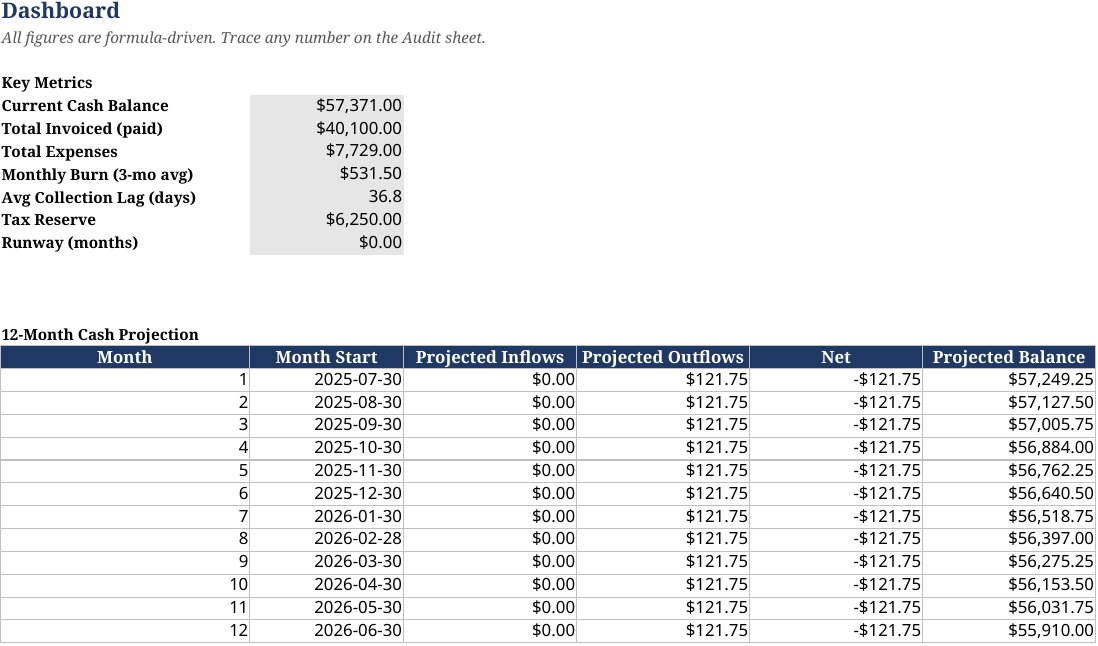
Runway — Freelance Cash-Flow & Runway Workbook is a polished Excel workbook (with a companion PDF) that tracks invoices, expenses, and cash runway. It ships with 200-row pre-built invoice and expense tables, three scenario toggles, a fully wired dashboard with 12-month projections, and a complete audit sheet.
The workbook contains six sheets and 474 formulas with zero formula errors. It includes seven named ranges for cleaner navigation and a 22-row audit sheet so you can verify the model's logic. The PDF is four A4 pages and includes one worked example.
How to Use It
Start by entering your opening cash balance and your recurring and one-off expenses into the expense table. Then log invoices into the 200-row invoice table—client, amount, issue date, and due date are the essentials. The workbook uses these entries to calculate cash balance, burn rate, collection lag, and runway.
Use the three scenario toggles to stress-test your position: for example, a slower collections scenario or a higher-expense month. The dashboard updates with 12-month projections so you can see how each scenario affects your runway. The audit sheet lets you trace the calculations and confirm the numbers reconcile.
The PDF is a four-page A4 reference that includes a worked example—useful for understanding the intended workflow before you start entering your own data, or for printing and keeping alongside your desk.
Tips and Settings
Keep the invoice table current: collection lag is only as accurate as your due dates and payment dates. If you routinely have late payers, model that in a scenario rather than assuming best-case timing.
Use the named ranges to jump quickly between key inputs and outputs. Before relying on the dashboard, open the audit sheet and confirm the 22-row check reconciles—this is your sanity check that entries are flowing through correctly.
The workbook is formula-driven, so avoid hard-coding values over formula cells. If you need to add rows beyond the pre-built tables, extend them consistently so the dashboard and projections continue to pick up your data.
Customising and Variations
The three scenario toggles are the main customisation lever: use them to compare a base case against slower collections or higher expenses. Because the model is wired with 474 formulas across six sheets, changes to inputs propagate to the dashboard and 12-month projections.
You can adapt the expense table to your own categories and the invoice table to your client list. The seven named ranges make it easier to adjust references if you restructure. The audit sheet is there to help you verify any changes you make.
Who It Is For
Runway is for freelancers and solo consultants who want to monitor cash balance, burn rate, collection lag, and runway under different scenarios—and who want a structured Excel model rather than a hand-built spreadsheet. It is priced at CA$39.99 and delivered as an Excel workbook plus a four-page PDF reference with a worked example.
If your main concern is never running out of money between client payments, this workbook is designed around that exact problem: tracking what is owed, what is going out, and how many months of runway remain under different assumptions.
FAQ
What exactly do I get when I buy Runway?
You get an Excel workbook (runway-workbook.xlsx) and a PDF (runway-workbook.pdf). The workbook has six sheets, 474 formulas with zero formula errors, 200 invoice rows, 15 expense rows, three scenario toggles, 12-month projections, a 22-row audit sheet, and seven named ranges. The PDF is four A4 pages and includes one worked example.
How does Runway calculate my runway?
The workbook uses your entered cash balance, expenses, and invoice data to calculate cash balance, burn rate, collection lag, and runway. The dashboard shows 12-month projections, and the three scenario toggles let you see how runway changes under different assumptions. The audit sheet lets you verify the calculations.
Can I use it if I have more than 200 invoices?
The invoice table is pre-built with 200 rows. If you need more, you can extend the table, but do so consistently so the dashboard and projections continue to reference your data. The audit sheet helps you confirm everything still reconciles.
What are the scenario toggles for?
The three scenario toggles let you stress-test your cash position—for example, slower collections or higher expenses—and see the effect on your 12-month projections and runway without rebuilding the model.
Is the PDF printable?
Yes. The PDF is four A4 pages and includes a worked example, so it can be printed and used as a reference alongside the workbook.
How much does it cost?
Runway — Freelance Cash-Flow & Runway Workbook is CA$39.99.
Need something else?
Describe what you need — agents design, build, check and ship it. Requests are free.
Ask the studio