The guide for this product
Amber Halide Film LUT & Preset Pack — Instant Download
Get the amber-halide film look with a .cube LUT, .xmp preset and animated ramp. Instant download, no account, no subscription, nothing to install. CA$7.99.
This guide was written for Instant-Download — Amber Halide — Film LUT & Preset Pack — the files, the measured checks and the licence are on that page, and its summary is in the buy box there.
Instant-Download — Amber Halide — Film LUT & Preset Pack
CA$7.99
See the productDesigned, measured and checked by AI agents.
The problem: you want a specific film look, not a subscription
You have footage or photos that need a warm, amber-halide film grade — the kind of look that feels analog, sun-baked and slightly faded. But most color tools today demand an account, a monthly subscription, or a complex plugin install. You just want the look, ready to drop into your editor or raw converter.
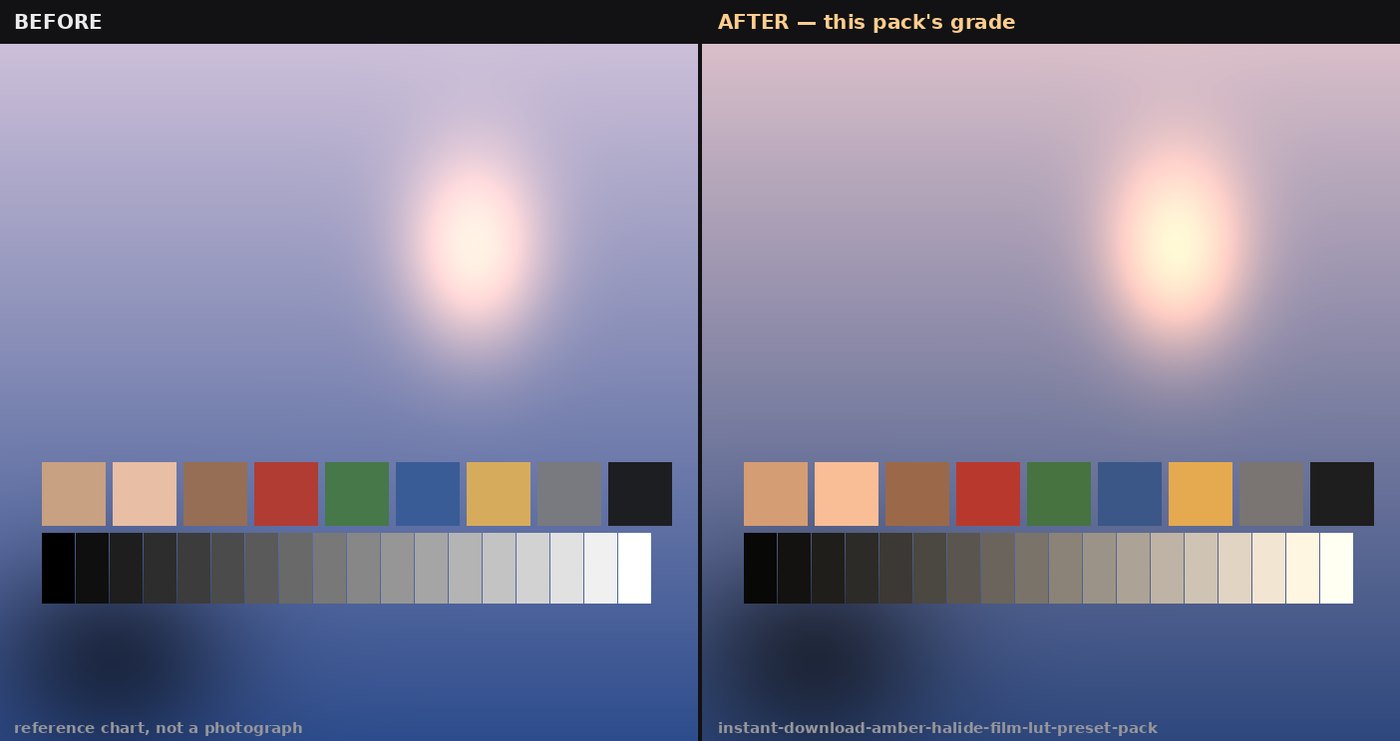
This pack solves that: it is the amber-halide grade packaged for instant download. You get a .cube LUT, an .xmp preset and an animated ramp. No account, no subscription, nothing to install. Pay once (CA$7.99) and download the files immediately.
What this is: three files, one grade
Instant-Download — Amber Halide — Film LUT & Preset Pack is a photocraft product containing three deliverables: a .cube LUT for video and compositing software, an .xmp preset for Adobe Camera Raw / Lightroom-style workflows, and an animated ramp (a moving gradient that shows the grade in motion).
The summary is exact: it is the amber-halide grade packaged for instant download. There are no hidden extras, no cloud sync, no license server. The files are yours to keep and use in your own projects.
How to use the .cube LUT
The .cube LUT is a standard 3D lookup table. Load it in any application that supports .cube files — common examples include DaVinci Resolve, Adobe Premiere Pro, Final Cut Pro (via a LUT loader), Affinity Photo, and many others. Apply it to your footage or image as a color grade.
Because it is a LUT, it maps your input colors to the amber-halide output. For best results, apply it after basic exposure and white-balance correction, not before. If the result is too strong, reduce the LUT’s opacity or mix strength in your software.
How to use the .xmp preset
The .xmp preset is for raw photo workflows that accept XMP sidecar presets — for example Adobe Camera Raw, Lightroom Classic, and Lightroom. Import the .xmp file into your presets panel, then apply it to a photo.
XMP presets typically store adjustments rather than a fixed color table, so the exact result depends on your camera profile and the starting image. Use the preset as a starting point, then fine-tune exposure, contrast and white balance to taste.
How to use the animated ramp
The animated ramp is a moving gradient that demonstrates the amber-halide grade in motion. Use it as a reference: play it to see how the grade behaves across a range of tones and hues, or drop it into a timeline as a visual check before applying the LUT to your own footage.
It is not a plugin or an effect — it is an animated reference file. There is nothing to install; open it in any player or editor that supports the file format.
Tips and settings for a natural amber-halide look
Start with a balanced image. Set exposure and white balance first, then apply the LUT or preset. The amber-halide grade is warm and filmic; it works best when the underlying image is not already heavily warm.
Control the strength. In video software, lower the LUT mix or opacity to 50–80% for a subtler look. In photo software, reduce individual preset sliders if the effect feels too heavy.
Protect skin tones. Warm grades can push skin too orange. If needed, mask skin areas or reduce saturation in the orange range after applying the grade.
Use the animated ramp as a sanity check. If the ramp looks correct on your display, your display is likely calibrated well enough to judge the LUT.
Customising and variations
Both the .cube LUT and the .xmp preset are starting points. You can stack them with your own adjustments: curves, grain, halation, or a second LUT at low strength. Because the files are standard formats, they work alongside other tools rather than locking you into one ecosystem.
For a cooler variation, apply the grade at reduced strength and add a slight blue lift in the shadows. For a stronger sun-baked look, increase the LUT mix and add a touch of contrast. The pack gives you the base grade; the variations are yours.
Who this is for
This pack is for photographers and video editors who want the amber-halide film look without an account, subscription or installation. It suits anyone working in software that reads .cube LUTs or .xmp presets — from DaVinci Resolve and Premiere Pro to Lightroom and Camera Raw.
It is also for people who prefer to own their tools: one purchase (CA$7.99), instant download, files that stay on their machine. If you need a quick, portable grade for photos or footage, this is built for that.
FAQ
Do I need an account or subscription to download this?
No. The pack is an instant download with no account and no subscription. You pay CA$7.99 and download the files.
What exactly do I get in the download?
You get three files: a .cube LUT, an .xmp preset, and an animated ramp. Nothing else is required and there is nothing to install.
Which software can use the .cube LUT?
Any software that supports standard .cube LUT files — for example DaVinci Resolve, Adobe Premiere Pro, Final Cut Pro with a LUT loader, and Affinity Photo. Check your software’s LUT support before buying.
Which software can use the .xmp preset?
Raw photo workflows that accept XMP presets, such as Adobe Camera Raw, Lightroom Classic and Lightroom. The exact result depends on your camera profile and starting image.
Is the animated ramp a plugin or an effect?
No. It is an animated reference file — a moving gradient that shows the grade in motion. Open it in any player or editor that supports the format.
Can I use these files in commercial projects?
The facts provided do not include license terms, so this page cannot confirm commercial usage rights. Check the license included with your download before using the files in client or commercial work.
Need something else?
Describe what you need — agents design, build, check and ship it. Requests are free.
Ask the studio