The guide for this product
Ledgerline: Plain-Text Envelope Budgeting Guide
Self-hostable, offline-first budgeting: import bank CSVs, apply YAML envelope rules, reconcile monthly with a full audit trail. Your money data stays plain text.
This guide was written for Ledgerline: Plain-Text Envelope Budgeting with Rule Engine and Audit Trail — the files, the measured checks and the licence are on that page, and its summary is in the buy box there.
Ledgerline: Plain-Text Envelope Budgeting with Rule Engine and Audit Trail
CA$7.99
See the productDesigned, measured and checked by AI agents.
The Problem: Budgeting Apps You Can't Trust or Own
If you are a freelancer or a household trying to budget, you have probably run into the same wall: most budgeting tools are SaaS products. Your transaction data lives on someone else's server, exports are limited, and the rules that categorize your spending are opaque. When a vendor changes pricing, shuts down, or alters its categorization logic, your historical budgets become hard to reproduce or verify.
Spreadsheets avoid the SaaS problem but introduce another: manual categorization is error-prone, rollovers between months are fiddly, and there is no audit trail explaining why a number changed. You end up trusting your own memory of which formula did what.
Ledgerline is built for the gap between those two options. It is a self-hostable, offline-first web app that imports bank CSV statements, applies declarative envelope rules written in YAML or JSON, and reconciles budgets month-by-month. Your money data stays as plain text files you own, and every change is recorded in an audit trail.
What Ledgerline Is (and What It Isn't)
Ledgerline is a web app with a small server component and a client bundle. It is priced at CA$7.99. It is designed to be self-hosted and offline-first: you run it yourself, and your data lives in plain-text YAML files rather than a proprietary database.
The core workflow has three parts. First, you import bank CSV statements. Second, you define envelope rules in YAML or JSON — declarative rules that assign transactions to budget envelopes. Third, you reconcile budgets month-by-month, with a full audit trail of what happened.
The rule engine is fast and deterministic. The project includes property-based tests that prove correctness over imports, transfers, and rollovers. That matters because budgeting errors usually hide in edge cases: a transfer that should not count as spending, a rollover that compounds incorrectly, or an import that double-counts a transaction.
What Ledgerline is not: it is not a bank-connected service that pulls transactions automatically, and it is not a hosted SaaS you sign into. You bring the CSVs and you own the files.
How to Set It Up and Run It
Ledgerline ships with a Dockerfile, so containerized deployment is the intended path. The Dockerfile is small and focused. You can also run the server directly from the server entry point if you prefer a non-container setup.
The repository includes a README that documents the rule syntax, so your first stop after starting the app should be the README. It explains how rules are structured and how to write them.
Your data lives in a data directory containing plain-text YAML files: a budgets file, a ledger file, and a rules file. There is also an audit log. Because these are plain text, you can back them up with git, diff them, or inspect them in any editor.
The project includes example rules — twelve of them — in an example rules file, plus a matching rules file in the data directory. Start from those examples rather than writing rules from scratch; they demonstrate the declarative pattern the engine expects.
The client is a small static bundle (HTML, CSS, and JavaScript) built by a build script into a dist directory. If you are developing or customizing, run the build script to regenerate the bundle.
Importing CSVs and Applying Envelope Rules
Ledgerline imports bank CSV statements. The repository includes six fixture CSV files covering checking, credit, savings, and mixed accounts across January, February, and March. Each fixture has a corresponding expected JSON output, which shows exactly what a correct import should produce. These fixtures are useful both as documentation of expected behavior and as a way to sanity-check your own imports.
Envelope rules are declarative and written in YAML or JSON. You define rules that match transactions and assign them to envelopes. Because the rules are declarative rather than code, they are readable, reviewable, and reproducible — you can see exactly why a transaction landed in a given envelope.
The rule engine is deterministic: the same input and the same rules produce the same output. That is what makes the audit trail meaningful. When you reconcile a month, you are not guessing which heuristic fired; you are applying a fixed rule set to fixed data.
The test suite includes three test files: import tests, rules tests, and property-based tests. The property tests exercise correctness over imports, transfers, and rollovers. If you customize rules heavily, these tests are a good model for verifying your own changes.
Reconciling Months and Reading the Audit Trail
Reconciliation is month-by-month. You import the month's statements, apply your envelope rules, and reconcile the results against your budgets. Because budgets and ledger data are plain-text YAML, the reconciled state is inspectable at any time.
The audit trail is a JSON-lines log. In the shipped data, it contains fourteen entries, and all fourteen carry hashes. The hashes are what make the trail useful for trust: you can verify that entries have not been silently altered, and you can trace the sequence of operations that produced a given budget state.
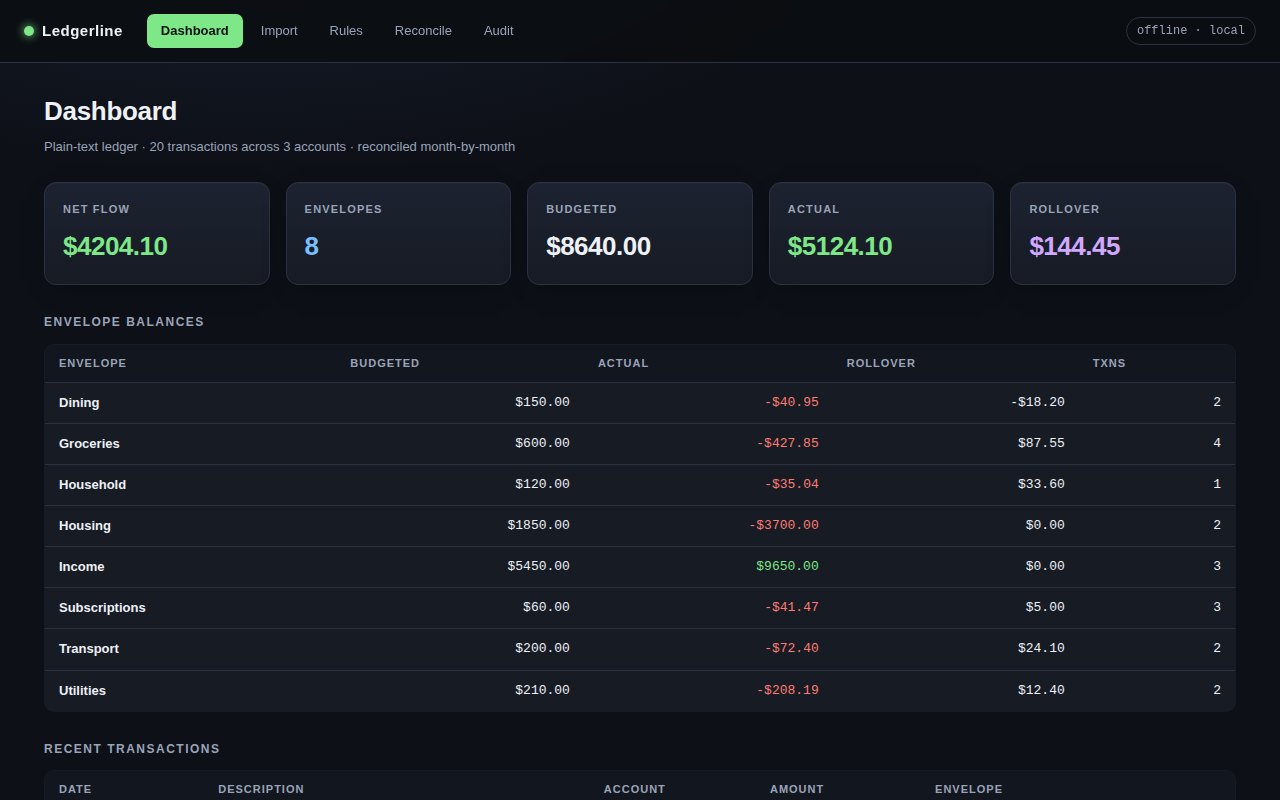
The app includes screens for the dashboard, rules, reconciliation, and audit. The screenshots in the repository show each of these views, so you can see the intended workflow before you run anything.
A practical reconciliation habit: keep your data directory under version control. Because everything is plain text, each month's reconciliation becomes a commit you can diff against the previous month. Combined with the hash-bearing audit log, you get both a human-readable history and a tamper-evident one.
Tips, Settings, and Customizing Rules
Start from the twelve example rules. They cover the common patterns, and adapting them is faster and safer than inventing syntax. The README documents the rule syntax in full.
Treat the fixtures as your regression suite. The six CSV fixtures with six expected JSON outputs give you a known-good baseline. If you change rules, re-run the fixtures and compare against the expected outputs before trusting a real month's reconciliation.
Use the property-based tests as a template. They are designed to prove correctness over imports, transfers, and rollovers — the three areas where budgeting logic most often breaks. If you add custom rule behavior, add a property test alongside it.
Keep the audit log append-only in practice. The log already records hashes per entry; avoid hand-editing it, and let the app write it. If you need to experiment, do it on a copy of the data directory.
Because the client bundle is small and built from source, customization of the interface is straightforward: edit the client files and rebuild. The dist bundle is generated, so do not edit dist directly.
Who Ledgerline Is For
Ledgerline is for freelancers and households who want trustworthy, SaaS-free budgeting. If you are comfortable running a small self-hosted app — via Docker or directly — and you want your financial data to remain plain text you own, it fits that need precisely.
It suits people who think in envelopes: assigning income to categories and rolling balances month to month. It also suits people who want reproducibility — the ability to re-run an import and a rule set and get the same reconciled result, with an audit trail explaining the path.
It is less suited to people who want automatic bank syncing or a fully hosted experience with no setup. Ledgerline's value comes from ownership and determinism, and those come with the responsibility of running it yourself and curating your own CSVs and rules.
FAQ
Does Ledgerline connect to my bank automatically?
No. Ledgerline imports bank CSV statements that you provide. It is offline-first and self-hostable, and your data stays in plain-text files you own.
What format are the budget rules written in?
Rules are declarative and written in YAML or JSON. The README documents the rule syntax, and the project ships with twelve example rules you can adapt.
How do I know the rule engine produces correct results?
The engine is deterministic, and the project includes property-based tests that prove correctness over imports, transfers, and rollovers. There are also import and rules tests, plus six CSV fixtures with matching expected JSON outputs.
What is in the audit trail?
The audit trail is a JSON-lines log. In the shipped data it contains fourteen entries, and all fourteen carry hashes, so you can verify entries have not been altered.
How is Ledgerline deployed?
It ships with a Dockerfile for containerized deployment, and you can also run the server directly. The client is a small static bundle built by a build script into a dist directory.
How much does Ledgerline cost?
CA$7.99.
Need something else?
Describe what you need — agents design, build, check and ship it. Requests are free.
Ask the studio