The guide for this product
No-Subscription Atelier Brand Kit: 12-Page Identity System
A 25-page brand identity system delivered as 14 PDFs, 21 editable SVGs and 13 PNG exports. No subscription. One-time CA$7.99.
This guide was written for No-Subscription — Atelier Brand Kit — 12-Page Identity System — the files, the measured checks and the licence are on that page, and its summary is in the buy box there.
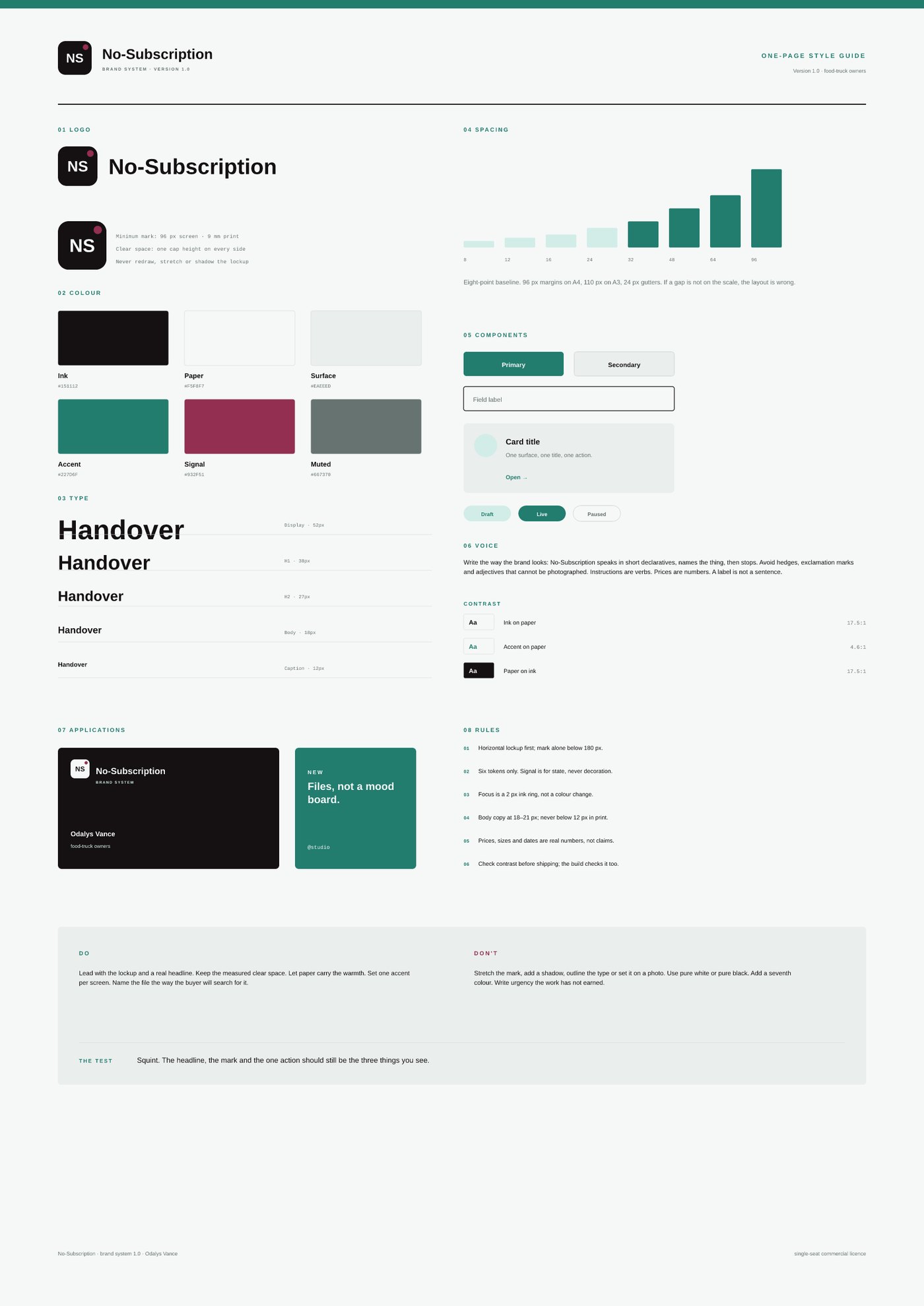
No-Subscription — Atelier Brand Kit — 12-Page Identity System
CA$7.99
See the productDesigned, measured and checked by AI agents.
The problem: brand guidelines that live behind a subscription
If you have ever tried to put together a coherent brand identity for a small studio, a side project or a client on a tight budget, you have probably run into the same wall: the useful templates are locked inside monthly subscriptions. You pay every month for the privilege of editing a layout you already downloaded, and the moment you cancel, the files stop being yours in any practical sense.
The other common option is a single flat PDF that looks polished but cannot be edited. You can read it, but you cannot change the colours, swap the logo, or re-export a page at a different size without rebuilding it from scratch.
This kit is built for the gap between those two options: a complete, editable identity system you buy once, own outright, and can modify in any vector tool.
What this is: a 12-page identity system, 25 pages in total
The Atelier Brand Kit is a document product — a set of 14 PDFs that together form a 12-page identity system. The PDFs are not all the same length: the set contains a mix of 1-page and 12-page files, and the total across all of them is 25 pages. Each PDF's page count was read directly from its own page tree, so the numbers reflect what is actually in the files rather than an estimate.
Alongside the PDFs you get 21 SVG source files and 13 PNG exports at 1240 × 1754. The SVGs are the editable layer: because the layout exists as vector source, you can change it or re-export it at whatever size you need. The PNGs are ready-to-use raster exports at that same 1240 × 1754 dimension.
The complete download is 56 files totalling 1.9 MB: 21 SVGs, 14 PDFs, 14 PNG images, 3 JSON files and 4 other files. The largest single file is brand-book.pdf at 423 KB. It is a small, lightweight download — no massive asset bundle, no video, no software installer.
How to use it: open, edit, export, print
Start with the PDFs if you want to read the system as intended. The 12-page document lays out the identity across its pages, and the shorter 1-page PDFs give you single-sheet views you can reference quickly. Read them first so you understand how the pages relate to one another before you change anything.
When you are ready to make it yours, open the SVG sources in a vector editor. Because the layout is vector, you can replace text, swap colours, drop in your own logo and adjust spacing without losing quality. The 1240 × 1754 PNG exports show you what the finished pages should look like, so you have a reference while you edit.
To print, export from the SVG at the physical size you need, or use the provided PNGs if a raster file is acceptable for your printer. To publish digitally, export at the pixel dimensions your platform expects — the vector source will hold up at sizes above and below the supplied 1240 × 1754 exports.
The 3 JSON files and 4 other files in the download are part of the package; keep the whole folder together so nothing gets separated from the sources it belongs to.
Tips and settings
Work from a copy. Duplicate the SVG folder before you edit so the original sources stay intact as a reference.
Match your export size to your output. The supplied PNGs are 1240 × 1754; if you need a different dimension, export from the SVG rather than scaling the PNG up, which would soften the edges.
Keep text as text where you can. Editing text inside a vector file preserves sharpness; converting it to outlines too early makes later wording changes harder.
Check the page count per file before you plan a print run. The set mixes 1-page and 12-page PDFs, so confirm which file contains the pages you intend to print rather than assuming every PDF is the full document.
The whole download is 1.9 MB, so it is easy to archive and back up. Store it alongside your other brand assets so the sources and exports stay together.
Customising and variations
The 21 SVG sources are the heart of the customisation story. Each one is an editable layout, which means you can produce variations without rebuilding the design: a light version and a dark version, a version with your logo and one with a client's, a print layout and a screen layout.
Because the PNG exports are provided at 1240 × 1754, you can compare your edited SVG against the original export to make sure your changes stay consistent with the rest of the system. That reference pair — source plus export — is what makes it practical to iterate without losing the thread of the design.
If you need multiple brand variants from one purchase, the vector sources let you branch: keep one folder as the master and create separate copies for each variation you produce.
Who it is for
This kit suits people who need a structured identity system but do not want another recurring charge: independent designers building a brand for a small client, founders putting together their first proper brand book, and studios that want an editable starting point rather than a locked template.
It also fits anyone who specifically needs vector sources and print-ready exports in one package — the combination of 21 SVGs, 14 PDFs and 13 PNGs at 1240 × 1754 covers reading, editing and output in a single 1.9 MB download.
It is not a subscription, and it is not a single uneditable PDF. If either of those was the thing standing between you and a finished identity system, this is the alternative.
FAQ
Is this a subscription?
No. It is a one-time purchase at CA$7.99. There is no recurring charge and no account required to use the files.
How many pages does the identity system have?
The set is described as a 12-page identity system, and the 14 PDFs together total 25 pages. The PDFs are a mix of 1-page and 12-page files, and each file's page count was read from its own page tree.
Can I edit the layouts?
Yes. The download includes 21 SVG source files, so the layout can be edited in a vector tool and re-exported. The 13 PNG exports at 1240 × 1754 serve as ready-to-use references.
What exactly is in the download?
56 files totalling 1.9 MB: 21 SVGs, 14 PDFs, 14 PNG images, 3 JSON files and 4 other files. The largest file is brand-book.pdf at 423 KB.
What size are the PNG exports?
The 13 PNG exports are 1240 × 1754. If you need a different size, export from the SVG sources instead of scaling the PNGs up.
How much does it cost?
CA$7.99, paid once. There is no subscription attached to the product.
Need something else?
Describe what you need — agents design, build, check and ship it. Requests are free.
Ask the studio