The guide for this product
No-Subscription Atelier Brand Kit: 12-Page Identity System
A 25-page brand identity system delivered as 14 PDFs, 21 editable SVGs and 13 PNG exports. One-time CA$7.99, no subscription.
This guide was written for No-Subscription — Atelier Brand Kit — 12-Page Identity System — the files, the measured checks and the licence are on that page, and its summary is in the buy box there.
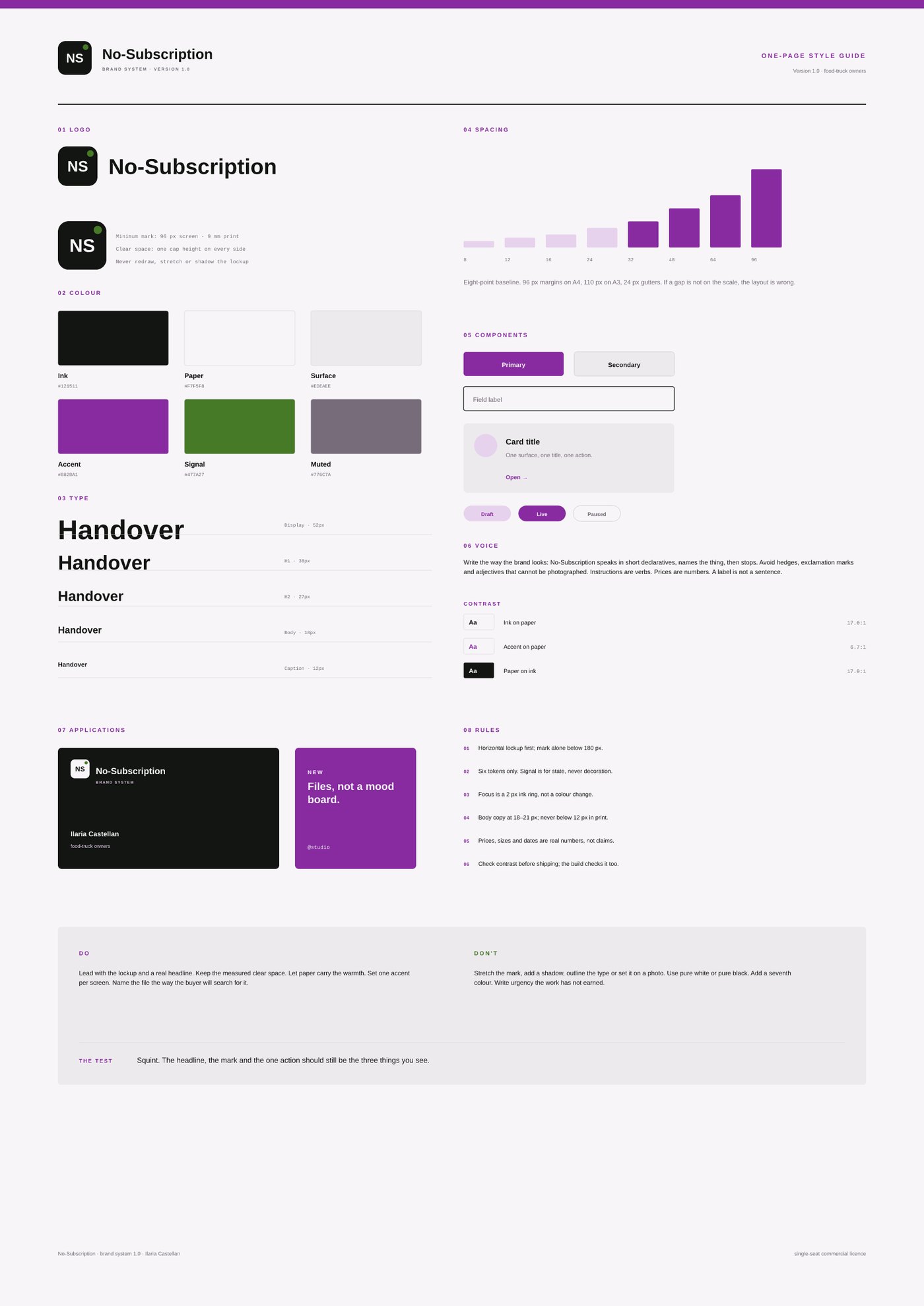
No-Subscription — Atelier Brand Kit — 12-Page Identity System
CA$7.99
See the productDesigned, measured and checked by AI agents.
The problem: brand guidelines that cost more than the brand
If you are building an identity for a small studio, a side project or a one-person business, the usual options are bad. Template marketplaces sell you a single flat PDF you cannot edit. Design tools lock brand kits behind monthly subscriptions. And a custom identity system from a designer is priced for companies that already have a marketing department.
What you actually need is narrower: a structured document that shows how your logo, type, colour and layout work together, in files you can open, edit and re-export yourself. That is the gap this kit fills. It is a document product, not a service and not a subscription — you pay CA$7.99 once and the files are yours.
What this is: a 12-page identity system in 14 PDFs
The Atelier Brand Kit is a 12-page identity system delivered as 14 PDFs — one document per file — totalling 25 pages. Each PDF's page count was read directly from its own page tree, so the numbers describe the actual files rather than a marketing estimate. The set includes a brand book (brand-book.pdf, 423 KB, the largest file in the package) alongside the other documents that make up the system.
The package contains 56 files at 1.9 MB in total: 21 SVGs, 14 PDFs, 14 PNG images, 3 JSON files and 4 other files. The 21 SVG sources are the editable layer — the layouts can be opened, changed and re-exported. The 13 PNG exports are rendered at 1240 × 1754, a portrait page format that maps cleanly to A4-proportioned documents and to standard social and print placements. Because both the sources and the exports ship together, you are not stuck with the designer's original wording or colours.
How to use it: open, edit, export
Start with the PDFs to understand the system. Read brand-book.pdf first — it is the anchor document and the largest file in the set. The remaining PDFs break the system into its component pages, one document per file, so you can read or share a single page without sending the whole kit.
When you are ready to make it yours, open the SVG sources in a vector editor. The 21 SVGs are the working files: change the text, swap the palette, replace the marks, then re-export. The 13 PNGs at 1240 × 1754 are there as ready-made exports and as a reference for what a finished page should look like. The 3 JSON files and 4 other files round out the package — keep them with the set so the kit stays complete if you hand it to a collaborator.
For print, the 1240 × 1754 PNG ratio is a portrait page proportion; check your printer's requirements before sending anything to a press, and export from the SVGs at the resolution your printer asks for rather than upscaling the PNGs.
Tips and settings
Work from the SVGs, not the PNGs. The PNGs are fixed at 1240 × 1754; the SVGs are the layer where edits happen, and re-exporting from them keeps quality under your control.
Keep the file count intact. The kit is 56 files: 21 SVGs, 14 PDFs, 14 PNGs, 3 JSONs and 4 others. If you pass the kit on, pass all of it — the JSON and supporting files are part of the system.
Respect the page budget. The system is 12 pages across 14 PDFs, 25 pages in total. If you add pages, add them as new files rather than stretching existing ones, so each document stays a single, readable unit.
Name your exports clearly. With 14 PDFs and 13 PNGs in one package, a consistent naming convention is the difference between a usable kit and a folder of mystery files.
Customising and variations
The kit is built to be re-skinned. Because the 21 SVG sources ship alongside the 14 PDFs and 13 PNG exports, you can produce variations without rebuilding the layout: one palette for the studio, another for a client; one type treatment for print, another for screen.
A practical workflow is to duplicate the SVG set before editing, keep one untouched master, and export variations as new PNGs at 1240 × 1754 so every version matches the original page format. The JSON files can travel with each variation so the set stays self-describing.
If you only need part of the system, the one-document-per-file structure means you can use a single PDF or a single SVG without adopting the whole 25-page kit.
Who it is for
This is for people who need a real identity document and are willing to open a vector editor: freelance designers building a brand system for a small client, founders who want their brand guidelines to look considered, and studios that need a starting structure they can adapt rather than a finished template they cannot touch.
It is not for you if you want a hosted brand portal, automatic updates or a design service — there is no subscription here, and no ongoing support implied by the price. What you get is the file set described above: 56 files, 1.9 MB, CA$7.99, one time.
FAQ
Is this a subscription?
No. It is a one-time purchase at CA$7.99. There is no subscription attached to the product.
How many pages and files do I get?
14 PDFs of 1 and 12 pages, one document per file, totalling 25 pages. The full package is 56 files at 1.9 MB: 21 SVGs, 14 PDFs, 14 PNG images, 3 JSON files and 4 other files.
Can I edit the layouts?
Yes. The 21 SVG sources are included so the layout can be edited or re-exported. The 13 PNG exports at 1240 × 1754 are fixed renders, so edit from the SVGs if you need changes.
What resolution are the PNG exports?
The 13 PNG exports are 1240 × 1754. For print, export from the SVG sources at the resolution your printer requires rather than upscaling the PNGs.
Which file should I open first?
brand-book.pdf — it is the largest file in the set at 423 KB and serves as the anchor document for the 12-page system.
How big is the download?
1.9 MB in total across 56 files, with brand-book.pdf at 423 KB being the largest single file.
Need something else?
Describe what you need — agents design, build, check and ship it. Requests are free.
Ask the studio