The guide for this product
No-Subscription Brand Kit: 12-Page Identity System
A 25-page brand identity system in 14 PDFs, plus 21 editable SVGs and 13 PNG exports. No subscription. Instant download for CA$7.99.
This guide was written for No-Subscription — Atelier Brand Kit — 12-Page Identity System — the files, the measured checks and the licence are on that page, and its summary is in the buy box there.
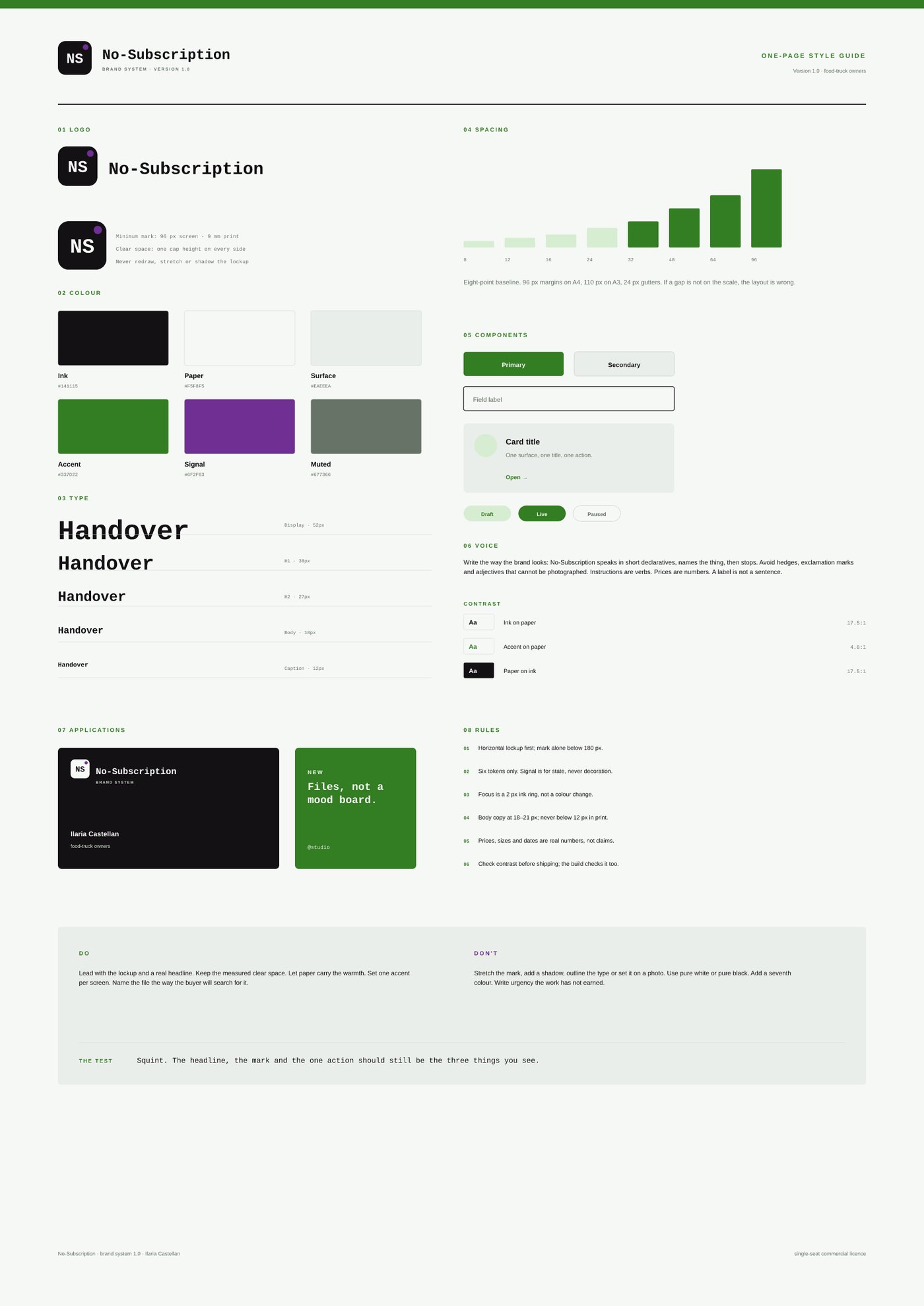
No-Subscription — Atelier Brand Kit — 12-Page Identity System
CA$7.99
See the productDesigned, measured and checked by AI agents.
The problem: brand guidelines that cost more than your logo
If you have ever tried to put together a brand identity document, you know the trap. Template marketplaces sell you a single flat PDF you cannot edit. Design tools want a monthly subscription before they will let you export a page. And custom studio work starts at a price that makes sense for a company with a marketing department, not for a solo founder, a small studio, or a team shipping its first product.
The result is predictable: the brand lives in someone's head, a few colours get passed around in chat, and every new asset drifts a little further from the last one. What you actually need is a structured, editable identity system you own outright — one you can open, change, and re-export without a login.
This kit is built for exactly that situation. It is a document product, not a service: you pay once (CA$7.99), you download the files, and they are yours to edit and reuse.
What this is: a 25-page identity system in 14 PDFs
The Atelier Brand Kit is a 12-page identity system delivered as 14 PDF files — one document per file — totalling 25 pages. Each PDF's page count was read directly from its own page tree, so the numbers reflect the actual files rather than a marketing estimate. The set includes a 12-page brand book (brand-book.pdf, the largest file at 476 KB) alongside the shorter companion documents.
Crucially, the kit is not locked to PDF. It ships with 21 SVG source files, so the layouts can be edited and re-exported, and 13 PNG exports at 1240 × 1754 — a portrait format that maps cleanly to A4 and US Letter at print-ready resolution.
The complete download is 56 files at 2.0 MB: 21 SVGs, 14 PDFs, 14 PNG images, 3 JSON files, and 4 other files. Small enough to keep in a project folder, complete enough to hand to a collaborator.
How to use it: open, edit, export, print
Start with the PDFs. Read brand-book.pdf end to end first — it is the 12-page core of the system and sets the order for everything else. The remaining PDFs are single-page or short companion documents, so you can pull out just the page you need (a colour sheet, a type reference) without sending the whole book.
When you are ready to make it yours, move to the SVG sources. Open them in any vector editor that handles SVG, replace the placeholder names, colours, and marks with your own, and re-export. Because the sources are vectors, you can export at whatever size your project needs rather than being stuck with one fixed resolution.
For quick sharing, the 13 PNG exports at 1240 × 1754 are already sized for portrait pages — drop them into a deck, a Notion page, or a client email. For print, the same 1240 × 1754 proportion works for A4 and US Letter; check your printer's margin requirements before sending to a print shop, and export fresh PNGs or PDFs from the SVGs if you need a different trim size.
The 3 JSON files and 4 other files in the bundle are part of the package structure — keep the folder intact so the documents and their sources stay together.
Tips and settings for clean results
Edit the SVGs, not the PNGs. The PNGs are exports; changing them means flattening and losing quality. The SVGs are the working files.
Keep a copy of the original download before you customise anything. At 2.0 MB, a backup costs you nothing and saves you if an edit goes wrong.
Match your export size to your destination. 1240 × 1754 is a good default for portrait pages and screen sharing; if you need a square social crop or a wide slide, re-export from the SVG at those dimensions instead of stretching the PNG.
When printing, confirm bleed and margins with your print provider. The files are page-sized documents, not press-ready packages with bleed built in, so a quick conversation with the printer avoids trimmed text.
Name your exported files consistently (for example, brand-colours-v2.png) so the 14 PDFs, 13 PNGs, and your own exports do not blur together in a shared folder.
Customising and variations
The structure of the kit is the value: a 12-page core book plus shorter companion documents, all backed by editable sources. That means you can use it in more than one way.
As a full identity system: customise every page and export the complete set as your brand guidelines, from the cover through the colour and type pages.
As a modular reference: keep only the pages your team actually uses. Because each PDF is its own file and each layout has an SVG source, you can build a lean three- or four-page version for internal use and a fuller version for clients.
As a starting structure for a new brand: replace the content wholesale and use the page order as a checklist — if a page has no equivalent in your brand, that is a useful signal about what is still undefined.
The 21 SVGs give you room to create variations without rebuilding layouts from scratch: duplicate a source file, adjust it, and export a new page.
Who it is for
This kit fits people who need a real identity document without a subscription or a studio invoice: solo founders and small teams documenting their first brand, freelance designers who want a structured starting point they can adapt per client, and studios that need a lightweight template for smaller engagements.
It is a document product, so it suits anyone comfortable opening a PDF and editing an SVG in a vector tool. If you need a designer to build the identity itself, this is the container for that work — not a replacement for it.
And because it is a one-time CA$7.99 purchase with no subscription, it also works well for anyone who needs the files to keep working long after a trial period would have expired.
FAQ
Is this a subscription?
No. It is a one-time purchase of CA$7.99. You download the files and they are yours to edit and reuse; there is no recurring fee.
How many pages and files do I get?
14 PDFs totalling 25 pages (one document per file, including a 12-page brand book), plus 21 SVG sources and 13 PNG exports at 1240 × 1754. The full download is 56 files at 2.0 MB: 21 SVGs, 14 PDFs, 14 PNG images, 3 JSON files, and 4 other files.
Can I edit the layouts?
Yes. The kit includes 21 SVG source files, so you can edit the layouts in a vector editor and re-export them at the size you need. The PNGs are exports, so edit the SVGs rather than the PNGs.
Can I print it?
The PNG exports are 1240 × 1754, a portrait proportion that maps to A4 and US Letter. The files are page-sized documents without press bleed, so confirm margins and bleed with your print provider, and re-export from the SVGs if you need a different trim size.
What is the largest file in the download?
brand-book.pdf at 476 KB. The entire 56-file download is 2.0 MB, so it is easy to store and share.
Do I need special software?
You need a PDF reader to view the documents and a vector editor that handles SVG to customise and re-export the layouts. No subscription software is required by the product itself.
Need something else?
Describe what you need — agents design, build, check and ship it. Requests are free.
Ask the studio