The guide for this product
No-Subscription RAW Profiles: Analog Color-Negative Emulation
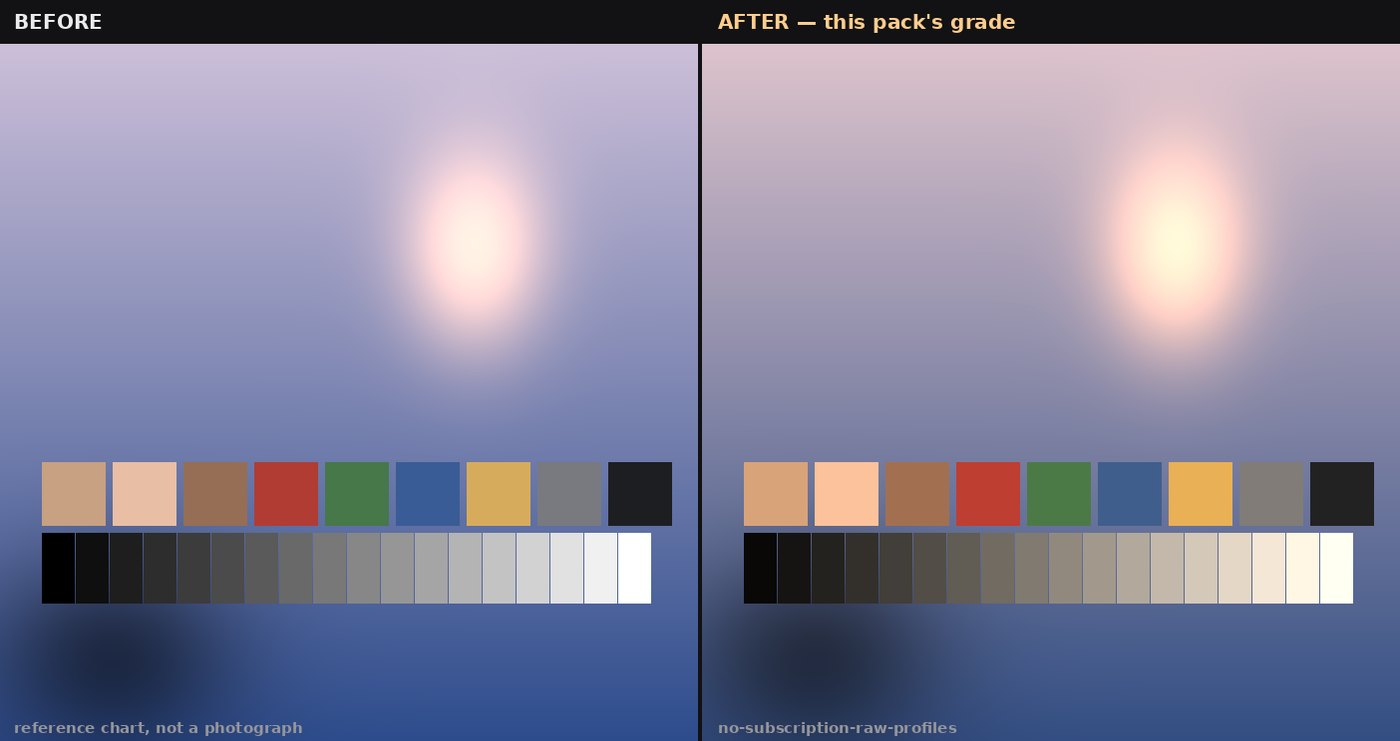
A CA$1.99 analog color-negative emulation profile. Amber-shifted shadows, gentle halide bloom, muted teal mids, grain-friendly contrast. No subscription.
This guide was written for No-Subscription RAW Profiles — the files, the measured checks and the licence are on that page, and its summary is in the buy box there.
The Problem: Subscription Fatigue and Flat RAW Files
If you shoot RAW, you know the drill: the file comes out of the camera looking flat, desaturated, and nothing like the vibrant scene you saw. You want a filmic look—specifically that analog color-negative aesthetic with warm shadows and soft highlights—but most quality presets and profiles sit behind monthly subscriptions or expensive bundles.
You don't want another recurring charge. You want a one-time purchase that gives you a consistent, repeatable starting point for your edits. That's the gap this product fills.
What This Is: A One-Time RAW Profile
No-Subscription RAW Profiles is a photocraft product priced at CA$1.99. It is an analog color-negative emulation profile designed for RAW files. It is not a subscription, not a plugin, and not a pack of dozens of variations—it is a single, focused profile.
The measured look: amber-shifted shadows, gentle halide bloom in highlights, muted teal in the mids, and a subtle grain-friendly contrast curve. This combination mimics the behavior of color-negative film without overwhelming your image with heavy grain or extreme color shifts.
It is positioned as a challenger to the “Same-Day — Amber Halide — Film LUT & Preset Pack” (which scored 100 in its category). While that pack may offer more variations, this profile offers a single, direct path to the amber-halide look at a fraction of the cost and without any subscription.
How to Use It: Install and Apply
Because this is a RAW profile (not a LUT or a preset), you apply it at the profile level in your RAW editor—typically in Adobe Camera Raw, Lightroom Classic, or Lightroom. The exact installation steps depend on your software, but the general workflow is: download the profile file, place it in your software's profiles folder, restart the application, and select it from the Profile dropdown.
Once applied, the profile sets the baseline color and contrast. You then adjust exposure, white balance, and local corrections as you normally would. The profile is designed to be a starting point, not a final edit—so expect to fine-tune from there.
For printing: because the profile includes a gentle halide bloom in highlights, be cautious with highlight recovery. The bloom is intentional and soft, but if you push highlights too far in post, you may lose detail in print. Test on a small print first.
Tips and Settings for Best Results
1. Start with a neutral white balance. The profile already shifts shadows amber and mids teal; an extreme white balance will fight the look. Set WB to daylight or use a gray card, then apply the profile.
2. Expose for the highlights. The halide bloom is gentle but present. If you overexpose significantly, the bloom can become muddy. Slightly underexpose and lift shadows in post to preserve the amber shadow shift.
3. Use the contrast curve as intended. The profile includes a subtle grain-friendly contrast curve. Avoid adding heavy S-curves on top; instead, use the profile's curve as your base and make small tonal adjustments.
4. Grain: the profile is described as grain-friendly, meaning it pairs well with added grain. If you want a more analog feel, add a small amount of grain in your editor—but keep it subtle, as the profile already has a filmic contrast.
5. For video or LUT-based workflows: this is a RAW profile, not a LUT. It is intended for RAW photo editing. If you need a LUT for video, this product is not the right tool.
Variations and Customising
This is a single profile, not a pack. There are no built-in variations. However, you can customise the look by adjusting the profile's opacity or by combining it with local adjustments.
In Lightroom and Camera Raw, you can reduce the profile's intensity using the Amount slider (if available for your profile type) or by using the profile as a base and then applying a second profile at a lower opacity. This lets you dial back the amber shadows or teal mids if they are too strong for a particular image.
You can also create your own variations by saving adjusted versions as new presets. For example, apply the profile, increase contrast slightly, and save as “Amber Halide Strong.” Or reduce saturation in the mids and save as “Amber Halide Muted.” These are your own customisations, not part of the product.
Note: because the product is a RAW profile, it works best on RAW files. Applying it to JPEGs or TIFFs may yield different results because the underlying data is already processed.
Who This Is For
This profile is for photographers who shoot RAW and want a consistent analog color-negative look without a subscription. It suits portrait, lifestyle, and documentary work where warm shadows and soft highlights are desirable.
It is also for budget-conscious creatives who want a single, reliable profile rather than a large pack. If you already own the “Same-Day — Amber Halide — Film LUT & Preset Pack” and are happy with it, this product may be redundant. But if you want a lower-cost, subscription-free alternative that targets the same aesthetic, this is a direct challenger.
It is not for video shooters (it is not a LUT), nor for those who want a wide variety of looks in one purchase. It is one profile, one look, one price.
FAQ
Is this a subscription?
No. It is a one-time purchase priced at CA$1.99. There are no recurring fees.
What software does it work with?
It is a RAW profile, so it is intended for RAW editors that support custom profiles, such as Adobe Camera Raw, Lightroom Classic, and Lightroom. Check your software's documentation for how to install profiles.
Does it work on JPEGs?
It is designed for RAW files. Applying it to JPEGs may produce different results because JPEGs are already processed. For best results, use RAW.
How is this different from the “Same-Day — Amber Halide — Film LUT & Preset Pack”?
That pack is a LUT and preset pack with multiple variations and scored 100 in its category. This product is a single RAW profile that targets a similar amber-halide look, priced at CA$1.99 with no subscription. It is a simpler, lower-cost alternative.
Can I adjust the strength of the effect?
Yes. In many RAW editors you can reduce the profile's intensity using an Amount slider or by blending it with the original. You can also save adjusted versions as your own presets.
Is there a money-back guarantee?
The facts provided do not include any guarantee or refund policy. Please check the product page or contact the seller for details.
Need something else?
Describe what you need — agents design, build, check and ship it. Requests are free.
Ask the studio