The guide for this product
Redstone Ready: 64× Readable Redstone Textures
A 64× resource pack that makes redstone power levels readable at a glance with a 16-step color ramp on dust, torches, repeaters, and more.
This guide was written for Redstone Ready — 64× Circuit-Readable Redstone Textures — the files, the measured checks and the licence are on that page, and its summary is in the buy box there.
Redstone Ready — 64× Circuit-Readable Redstone Textures
CA$4.99
See the productDesigned, measured and checked by AI agents.
The Problem: Redstone Is Hard to Read
If you build redstone circuits in Minecraft, you know the frustration: a line of dust looks the same whether it carries zero power or fifteen. To find out what is actually happening, you have to open the F3 debug screen, hover over blocks, or place a comparator and probe the signal. That breaks your flow and turns every debugging session into a stop-and-check routine.
The same problem applies to component state. Is that repeater on its first or fourth delay? Is the comparator in subtract mode? Is the piston extended or retracted? In vanilla textures, these differences are subtle, especially at a distance or in a busy build. You end up squinting at blocks instead of thinking about the circuit.
Redstone Ready is built around a single idea: the texture itself should tell you the power level and block state, so you can debug by looking rather than by probing.
What This Pack Is
Redstone Ready is a 64× resource pack that applies a consistent 16-step color ramp to redstone dust, torches, repeaters, comparators, pistons, and note blocks. Each power level gets its own color step, so a signal's strength is visible directly on the block. The same ramp is used across components, which means you learn the color scale once and can read it everywhere.
The pack is delivered as a standard resource pack zip with an mcmeta file, so it installs the same way as any other resource pack. The measured contents include 241 resource pack entries and 199 PNG textures. It is a texture pack, not a mod: it changes how redstone looks, not how it behaves.
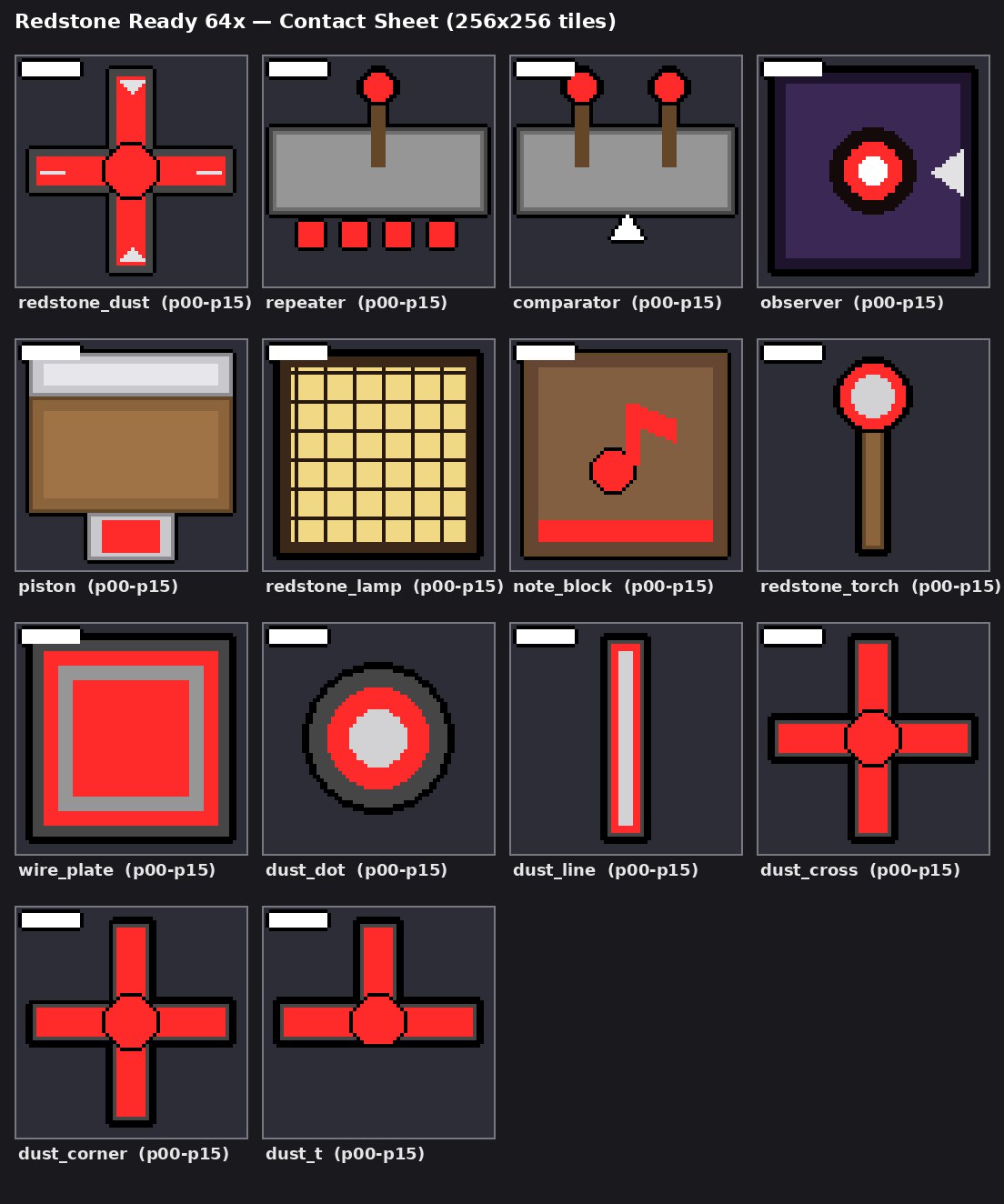
Alongside the pack, the download includes a contact sheet (1104×1324) with large individual tiles, an in-context preview build (1920×1080), a toggle demo and proof image, a README with the color reference, and a short 15-second trailer. These are inspection materials: you can study the exact tiles and see the pack in a real build before you install it.
How to Install and Use It
Installation follows the normal resource pack process. Place the Redstone Ready zip in your resourcepacks folder, then enable it in the game's resource pack menu. Because the pack ships with an mcmeta file, Minecraft recognizes it as a valid pack. Keep the zip intact rather than unpacking it.
Once enabled, the color ramp is active on all supported components. The practical workflow is simple: build or open a circuit, then read the colors. A dust line that changes color along its length shows you exactly where power drops. A torch that is lit versus unlit, a repeater's delay setting, a comparator's mode, a piston's extension state, and a note block's state all become visible at a glance.
Before installing, open the contact sheet to see each tile at large size, and look at the in-context preview to see how the ramp reads inside an actual build. The README contains the 16 hex colors used in the ramp, so you can keep the scale handy while you learn it. The toggle demo and proof images show the pack switched on and off for comparison.
Tips for Reading the Ramp
Treat the 16-step ramp as a scale from weakest to strongest signal. Because the same ramp is applied across dust, torches, repeaters, comparators, pistons, and note blocks, you can compare colors between different components in the same circuit. If a dust line and a comparator output show different steps, you have found where the signal changes.
Use the contact sheet as a reference card while you learn the scale. The README lists all 16 hex colors, which is useful if you want to build your own reference chart or compare the pack's colors against a circuit diagram. The in-context preview is the best guide to how the ramp looks at normal viewing distance in a real build.
The pack is designed for reading state, not for replacing debugging tools entirely. It complements F3 and comparator probing by making the common cases visible without them. For unusual circuits, you can still confirm exact values with the tools you already use.
What Is Included and How to Inspect It
The download contains the main resource pack zip and a toggle zip, plus a README, a contact sheet, an in-context preview, a toggle demo, a toggle proof image, a trailer, and the trailer script. The measured file list is: redstone-ready-64x.zip, redstone-ready-toggle.zip, README.txt, contact_sheet.png, preview_in_game.png, toggle_demo.png, toggle_proof.png, trailer.mp4, and trailer_script.txt.
The contact sheet is 1104×1324 with large individual tiles, which makes it the best way to inspect texture detail before buying or installing. The preview is 1920×1080 and shows the pack in a real build. The toggle demo and proof images let you compare the pack against the default look. The trailer runs 15 seconds and is a quick overview.
The README is 325 words and lists 16 hex colors, matching the 16-step ramp. If you want to verify the pack's contents, the zip contains 241 entries and 199 PNG textures, with one mcmeta file.
Customising and Variations
The pack is a texture pack, so any customisation happens at the file level: you can open the zip and inspect the PNG textures, and the README's 16 hex colors give you the exact ramp values if you want to adjust or extend the palette for personal use. The toggle zip provides a second pack variant for switching between looks, and the toggle demo and proof images show what that toggle changes.
Because the pack uses a consistent ramp across components, any change you make to the color scale should be applied across all the included textures to keep the scale readable. The contact sheet is the practical place to check consistency: it shows the individual tiles side by side, so you can compare colors across components at a glance.
Who It Is For
Redstone Ready is for redstone engineers and technical Minecraft players who debug circuits regularly and want to read power level, block state, and component mode directly from the texture. If you spend time tracing dust lines, checking repeater delays, or confirming comparator modes, the pack is built for that workflow.
It is also useful for players learning redstone: the color ramp makes abstract power levels visible, which can make circuit behavior easier to understand. Because it is a resource pack rather than a mod, it does not change game mechanics, so it is suitable for anyone who wants better readability without altering how redstone works.
It is not a replacement for F3 or comparator probing in every situation, and it does not add new redstone functionality. It is a readability layer for the components it covers: dust, torches, repeaters, comparators, pistons, and note blocks.
FAQ
Does Redstone Ready change how redstone works?
No. It is a 64× resource pack that changes textures only. It applies a 16-step color ramp to dust, torches, repeaters, comparators, pistons, and note blocks, but it does not alter game mechanics or redstone behavior.
How do I install the pack?
Place the resource pack zip in your resourcepacks folder and enable it in the game's resource pack menu. The pack includes an mcmeta file, so Minecraft recognizes it as a valid resource pack. Keep the zip intact.
What is in the download?
The download includes redstone-ready-64x.zip, redstone-ready-toggle.zip, README.txt, contact_sheet.png, preview_in_game.png, toggle_demo.png, toggle_proof.png, trailer.mp4, and trailer_script.txt. The main pack contains 241 entries and 199 PNG textures.
Can I see the textures before installing?
Yes. The contact sheet (1104×1324) shows large individual tiles, and the in-context preview (1920×1080) shows the pack in a real build. The toggle demo and proof images show the pack switched on and off for comparison.
What are the 16 colors used in the ramp?
The README lists all 16 hex colors used in the ramp. It is 325 words long and serves as the color reference for the pack.
Which blocks does the pack cover?
The pack applies its color ramp to redstone dust, torches, repeaters, comparators, pistons, and note blocks. The same 16-step ramp is used across these components so power levels and states read consistently.
Need something else?
Describe what you need — agents design, build, check and ship it. Requests are free.
Ask the studio