The guide for this product
Stylized Wooden Treasure Chest: Game-Ready glTF Prop Guide
A practical guide to using this stylized wooden treasure chest glTF prop in games and renders. Specs, tips, and customisation for artists.
This guide was written for Stylized wooden treasure chest, game-ready glTF prop — the files, the measured checks and the licence are on that page, and its summary is in the buy box there.
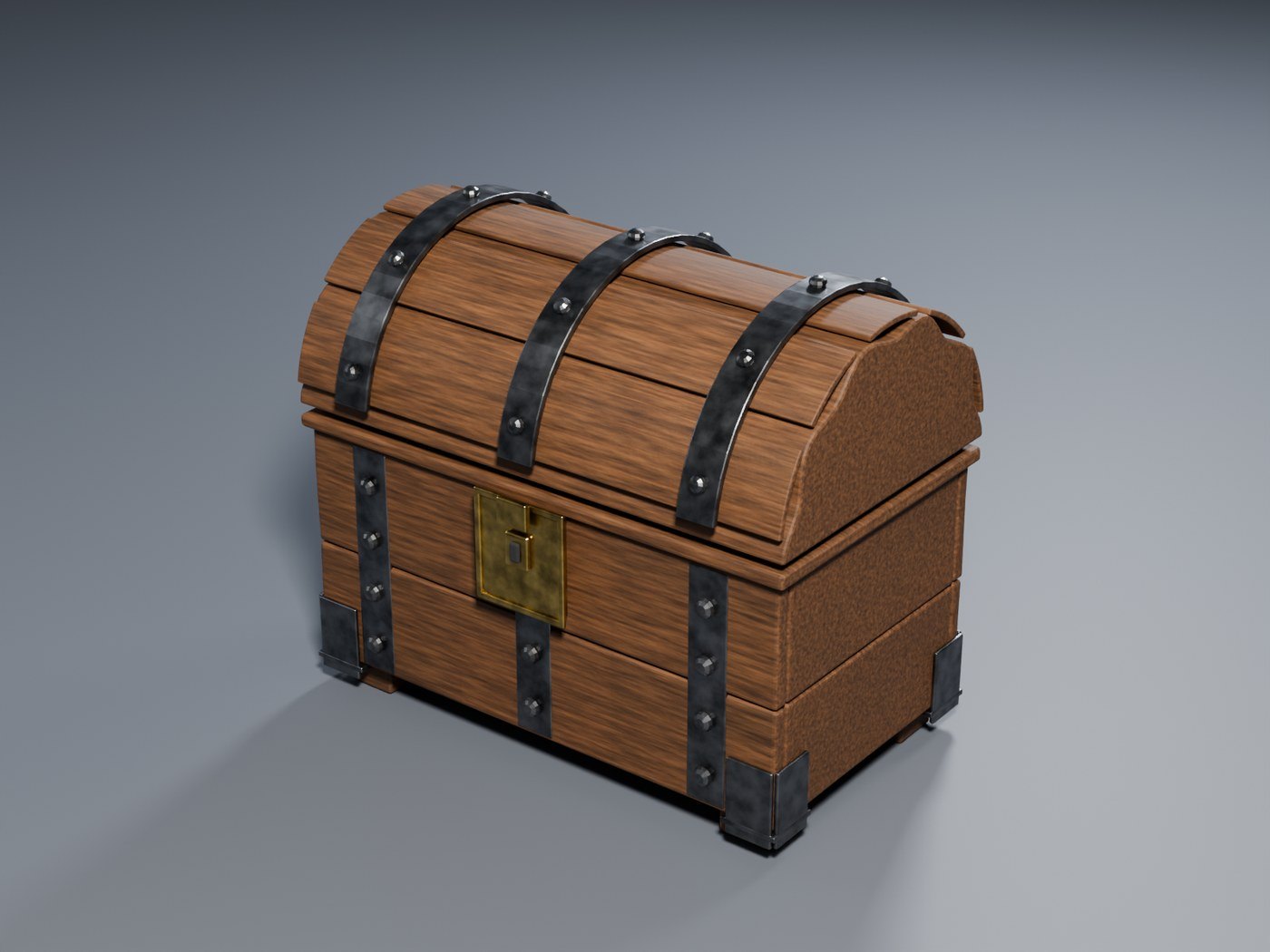
Stylized wooden treasure chest, game-ready glTF prop
CA$3.99
See the productDesigned, measured and checked by AI agents.
The Problem: You Need a Convincing Loot Chest, Fast
Every fantasy or adventure game needs a treasure chest. It is the reward moment, the payoff for exploration, the thing players click on. But building one from scratch takes time: modelling planks, bevelling edges, adding iron straps, rivets, a lock plate, and a keyhole. Then you need UVs, PBR materials, and a clean export that will not break in-engine.
This guide is for game artists and level designers who need a ready-made hero prop that looks handcrafted but is technically clean. It is also for product renderers who need a detailed asset for e-commerce or portfolio shots without spending days on modelling.
The chest in this guide solves that specific problem: a stylized wooden treasure chest built from individually bevelled oak planks with visible per-plank colour variation, continuous 3D iron straps with chamfered edges and rivets, and a detailed brass lock plate with a modelled keyhole and hasp. It is exported as glTF with PBR materials, ready for game engines and renders.
What This Chest Actually Is (Measured Facts)
This is a Blender-built asset delivered as a glTF file. The download contains model.glb plus three renders: renders/back.png, renders/hero.png, and renders/top.png. The assembly bounding box measures 1132 mm × 743 mm × 1005 mm, so it is sized like a real-world chest rather than a tiny game token. You can scale it in-engine as needed.
The mesh measures 23,876 triangles. That is a mid-poly hero prop: detailed enough for close-up shots and product renders, but still manageable for real-time use. There are 4 materials, which keeps the material setup simple and predictable. The GLB file is 2,291,688 bytes (about 2.3 MB), a reasonable size for a hero asset.
The materials are PBR and show material detail measured at 1.0, meaning the surface variation is present and not flattened out. A black-patch check measured 0.08 patches per 10,000, which indicates the renders and materials do not suffer from obvious black artifacts or missing texture areas. In short: the files are clean and the detail is real.
How to Use It in a Game Engine
Import model.glb into your engine of choice. Because it is glTF with PBR materials, it should come in with base colour, roughness, and metallic channels intact. Check the material assignment after import: there are 4 materials, so you should see four slots. If your engine splits or merges them, verify that the iron straps, brass lock, wood planks, and any secondary details still read correctly.
The chest is a static prop. Place it in your level as a loot container, a set dressing piece, or an interactive object. The bounding box of roughly 1.1 m wide by 0.74 m deep by 1.0 m tall gives you a realistic scale reference. If your game uses a different unit scale, adjust the import scale accordingly rather than editing the mesh.
For interaction, add your own collider or trigger volume. The chest does not ship with a collision mesh, so you will need to generate one in-engine. A simple box collider matching the bounding box is usually enough for a loot chest. If players can open it, you will need to separate the lid or animate it yourself; the asset is a single assembly, not a rigged opening chest.
Use the three renders as reference. renders/hero.png shows the chest in a presentation view, renders/back.png shows the rear construction, and renders/top.png shows the lid and strap layout. These are useful for matching lighting and for checking that your in-engine version looks consistent with the intended design.
Tips and Settings for Renders and Real-Time
For product renders, use the hero render as a lighting reference. The chest is designed as a hero prop, so it rewards close-up framing. Because the planks are individually bevelled and have per-plank colour variation, raking light will bring out the wood grain and edge highlights. Avoid flat, frontal lighting that hides the bevels.
The iron straps are continuous 3D geometry with chamfered edges and rivets, and the brass lock plate has a modelled keyhole and hasp. These details are geometric, not just painted into a texture. That means they hold up under parallax and close inspection. In real-time, keep your normal maps consistent with the geometry so the chamfers and rivets do not fight the shading.
With 23,876 triangles and 4 materials, the chest is suitable for hero placement in real-time scenes. If you need many chests on screen, consider a lower-poly variant or instancing. The 2.3 MB GLB is small enough to load quickly, but if you are streaming many props, keep an eye on total texture memory.
The black-patch measurement of 0.08 per 10,000 suggests the materials are clean. Still, always check your own lighting setup: very dark environments can make any asset look like it has black patches. Use a neutral environment light when validating the import.
Customising and Variations
Because the chest is built from individually bevelled planks, you can create colour variations by adjusting the per-plank colour variation in the material. The 4 materials give you natural separation: wood, iron, brass, and any secondary detail. Duplicate the asset and shift the wood hue for different biomes or rarity tiers.
The iron straps and brass lock are separate material slots, so you can swap the metal look without touching the wood. For a cursed or magical variant, change the brass to a darker metal or add an emissive accent. For a pirate or coastal theme, increase the roughness on the iron to suggest salt weathering.
If you need an open chest, you will have to separate the lid geometry in Blender or your DCC tool. The delivered model is a single assembly, so plan for that extra step if your game requires an opening animation. The renders show the closed state, which is the intended hero presentation.
Scale is easy to adjust. The bounding box is 1132 × 743 × 1005 mm, so you can uniformly scale it to match your game's unit system. Avoid non-uniform scaling, which can distort the chamfers and rivets.
Who This Is For
Game artists and level designers building fantasy or adventure games will find this chest useful as a loot prop. It is detailed enough to be a reward object and clean enough to import without surprises. The measured triangle count and material count give you predictable performance.
Product renderers and portfolio builders can use it as a hero asset for e-commerce or presentation shots. The three included renders and the PBR materials make it easy to match a look. The 2.3 MB GLB is light enough to move between tools.
It is not a rigged, animated chest, and it does not include a collision mesh. If you need those, plan to add them. But if you need a stylized, handcrafted-looking treasure chest with real geometric detail, this asset is built for that job.
FAQ
What file format is the chest delivered in?
It is delivered as model.glb, a glTF file with PBR materials. The download also includes three renders: renders/back.png, renders/hero.png, and renders/top.png.
How many triangles does the chest have?
The mesh measures 23,876 triangles. That makes it a mid-poly hero prop suitable for close-up renders and real-time hero placement.
Does the chest come with a collision mesh or opening animation?
No. The asset is a single static assembly. You will need to add a collider in-engine and separate or animate the lid yourself if you need an opening chest.
What are the dimensions of the chest?
The assembly bounding box measures 1132 mm × 743 mm × 1005 mm. You can scale it uniformly to match your project's unit system.
How many materials does it use?
It uses 4 materials. This keeps the setup simple and gives you natural separation for wood, iron, brass, and secondary details.
Is the detail real geometry or just textures?
The iron straps are continuous 3D geometry with chamfered edges and rivets, and the brass lock plate has a modelled keyhole and hasp. The planks are individually bevelled with per-plank colour variation.
Need something else?
Describe what you need — agents design, build, check and ship it. Requests are free.
Ask the studio